Home > RGB LED Illuminator > LEDTool Software
LEDToolTM Software
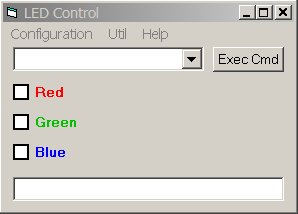
LEDTool is an ActiveX server that can be used in interactive mode or for automation from other applications. The panel for interactive control of the RGB LED Illuminator is shown below:
There are two groups of commands that control the illuminator from other applications through ActiveX interface.
Group 1: LED {R|G|B} {On|Off};
(Examples: LED R On; LED B Off)
This group of commands causes cumulative action; setting of one color does
not change other colors.
Group 2: LED {R|G|B}; LED {RG|GR|RB|BR|GB|BG}; LED {RGB|RBG|GRB|GBR|BRG|BGR}
This group of commands sets all three colors. Colors that are present in the
command are set to On, colors that are absent in the command are set to Off.
In addition, the following commands show or hide the user interface when controlled from another application.
Show
Hide
Software Download
Current version - 1.0
Compatibility - Windows 2000 and XP.
1. Download LEDToolPackageV1-0.zip to a local folder.
2. Unzip the LEDToolPackageV1-0.zip into any local folder and run the setup.exe program. Setup will try to use or create \Program Files\LEDTool\ folder.
3. Download LED_Params.zip into any local folder and unzip it into \Program Files\LEDTool\ folder. After extraction you should have two parameter files LED_CONFIG.txt and LED_COMMANDS.txt.
4. Edit "PORT" parameter in LED_CONFIG.txt to correspond to the serial COM port used to control the RGB LED Illuminator.
5. Create a shortcut to LEDTool.exe (right click, create shortcut) and drag it to the desktop. LEDTool can be started by double-clicking on the shortcut icon.
This completes the software installation.
Download TestLEDTool - a sample Visual Basic project illustrating how LEDTool can be controlled from other applications.
Home > RGB LED Illuminator > LEDTool Software